This post is part of the Coupang Partners program, and I receive a commission through this activity.
Logitech G502 X PLUS MR0089 and Razer Basilisk V3 Pro 35K RZ01-0524. Excludes wired G502 X, G502 X LIGHTSPEED, the older 30K Basilisk V3 Pro and wired Basilisk V3 35K. Logitech photo: white; purchase option: black.
First published 2026-09-24Updated 2026-09-24
A
Logitech G502 X PLUS MR0089
₩154,900
Black · MR0089 / 910-006166 · Displayed selling price checked September 24, 2026. No separate WOW or coupon condition was shown. Logitech photo: white; purchase option: black.
A good fit if you want to adjust thumb-button reach, avoid accidental presses and reduce weight within this feature-rich class. An existing POWERPLAY setup can also make the decision easier.
Razer Basilisk V3 Pro 35K RZ01-0524
A good fit if you switch between gaming wireless and Bluetooth, or want the wheel to enter free-spin automatically in long documents. High polling and wireless charging require checking accessory costs.
A closer look
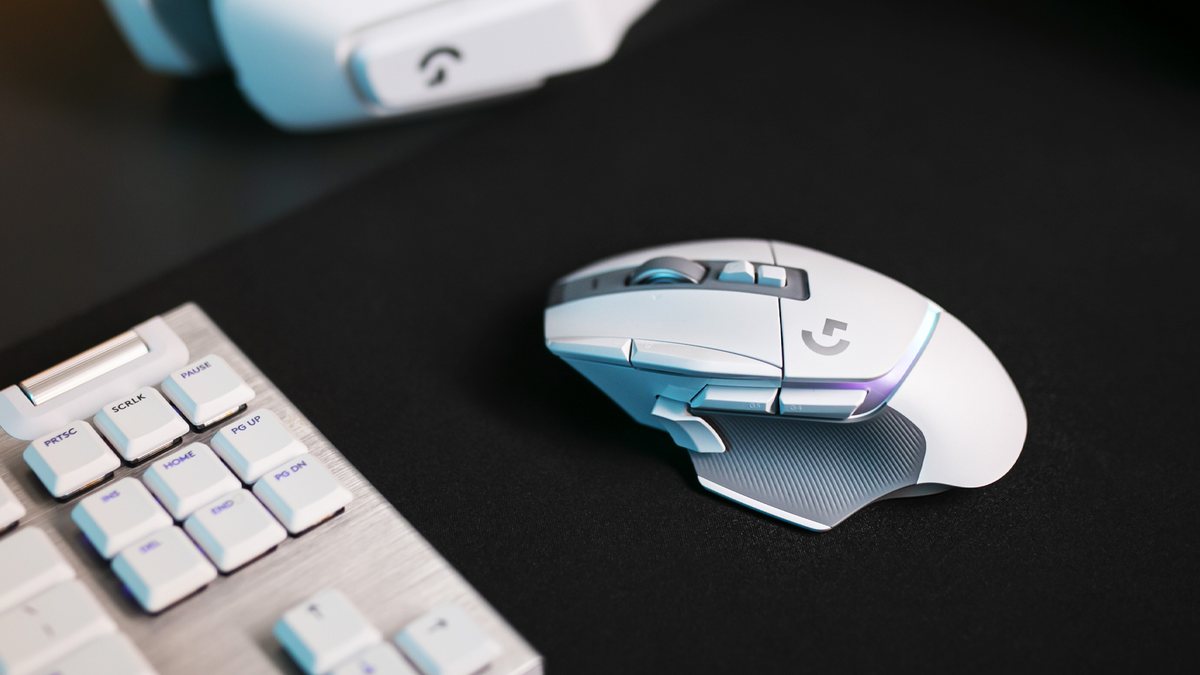
Official launch photograph of the WHITE G502 X PLUS. This article’s purchase link and ₩154,900 price refer to BLACK. The pictured keyboard and headset do not imply bundle contents.
The G502 X PLUS DPI-shift control can be reversed or replaced by a cover. This changes its reach or removes a control prone to accidental presses. Separate DPI up/down controls sit beside the index finger.
The Basilisk V3 Pro 35K thumb trigger is fixed. Remapping its command does not change its physical position. Logitech allows a physical adjustment; Razer requires the fixed placement to suit the user’s hand.
Both offer notched and free-spin modes. G502 X PLUS switches with a button, so spinning faster does not change the selected mode. Its wheel also supports left/right tilt.
Basilisk V3 Pro 35K offers manual switching and optional Smart-Reel automatic switching when scrolling quickly. Synapse 4 adjusts the threshold and acceleration. Its distinction is automatic switching, not exclusive access to free-spin scrolling.
G502 X PLUS connects through its LIGHTSPEED receiver or USB cable. Without Bluetooth, a laptop also needs a receiver or cable. A single-PC setup uses these straightforward connection paths.
Basilisk V3 Pro 35K adds Bluetooth to its receiver and USB wired options. The receiver can stay at the gaming PC while another device uses Bluetooth. Up to 8,000Hz wireless polling requires an additional receiver or dock and is separate from Bluetooth convenience.
The black options checked on September 24 cost ₩154,900 for Logitech and ₩229,000 for Razer, a ₩74,100 difference. Both work with their standard wired/wireless connections without buying wireless-charging equipment. Bluetooth and the automatic wheel are built into Razer; maximum-polling accessories are extra.
Logitech POWERPLAY and Razer’s compatible charging pucks, docks and mats are separate charging setups. Existing accessories affect the total cost. The links here select black mouse units, not bundles including those charging accessories.
The public exact-model comparison supplies default weights under the same methodology and discusses connection and control-layout differences.
Updated May 21, 2026; Methodology v1.5.2. Only the public introduction and weights were used. Locked latency, battery and scoring results were not read.
The DPI-shift control is reversible and removable, with a cover available in its place. DPI up/down controls sit near the index finger.
The left-side multi-function trigger cannot be removed, so its reach needs to suit your thumb.
Logitech offers a physical adjustment when the trigger is awkward. Programmable-control totals include wheel inputs and are not physical-button counts.
The official guide lists a 1ms interval for the main gaming profile, equivalent to 1,000Hz.
Razer requires the separately sold Mouse Dock Pro or HyperPolling Wireless Dongle for up to 8,000Hz.
Do not treat Razer’s maximum as the standard box configuration. Polling rate is neither complete click-to-screen latency nor a multiplier for gaming ability.
Choose it for adjustable thumb-button reach and a lighter sample weight when a receiver-based setup meets your needs.
Trade-offs It lacks Bluetooth and automatic wheel-mode switching. The weight advantage cannot compensate for a shape that does not fit your hand.
B
Razer Basilisk V3 Pro 35K RZ01-0524
Choose it for switching between Bluetooth and gaming wireless, or using Smart-Reel with long documents.
Trade-offs The tested sample is heavier and the thumb trigger cannot be removed. Equipment for 8,000Hz and wireless charging costs extra.
Before buying in Korea
Confirm G502 X PLUS MR0089 / Basilisk V3 Pro 35K RZ01-0524.
Check selected color, actual seller and Korean warranty provider.
Check inclusion of Razer’s 8,000Hz receiver/dock and either mouse’s wireless charging hardware.
Recheck the final price, WOW/coupon/card conditions and delivery availability at checkout.
View buying options
Logitech G502 X PLUS MR0089
₩154,900
Black · MR0089 / 910-006166 · Displayed selling price checked September 24, 2026. No separate WOW or coupon condition was shown. Logitech photo: white; purchase option: black.
Check product options and the final checkout total with the retailer.
Vote & comment
Vote and join the conversation
Visitor poll
This poll is open to visitors who choose to take part. Votes are counted separately from external surveys and do not represent the whole population.
Which better fits my hand and the way I play and work?
Which side would you choose in this comparison?
Choose another option to change your vote.
Participate without signing in. Use the same browser to delete your comments or withdraw your vote. Clearing cookies or waiting 90 days removes this access.
Comments
Respect different opinions. Abuse, personal attacks, private information and spam may be restricted. Comment guidelines · Privacy policy
Comments
Respect different opinions. Abuse, personal attacks, private information and spam may be restricted. Comment guidelines · Privacy policy